What happens to a problem once I've dealt with it?
Mark it resolved and it's hidden. Re-planning keeps it resolved.
Solutions: decide what matters
When tomorrow is planned, you don't read every run. You read one list of the things that need a decision.
Most of tomorrow plans itself. The part that needs you sits in one list on the Day page, called Decide before the day. Each item says what's wrong, why, and what you could do about it.
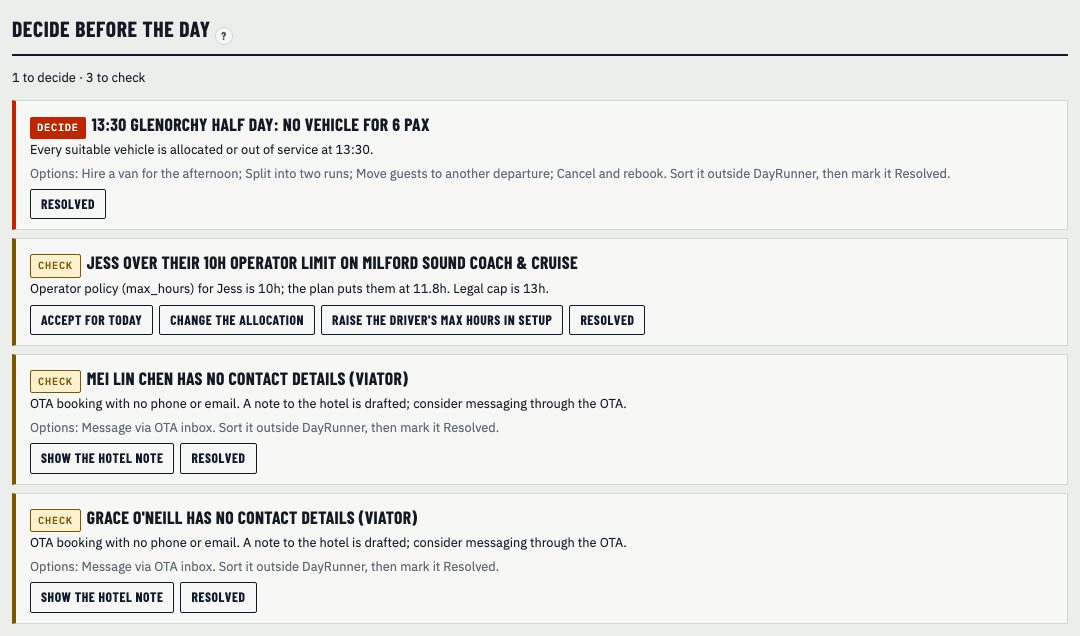
Decide means the planner couldn't solve it, or the plan would break a rule. A run with no vehicle. A driver who'd go over the 13-hour work day. A vehicle that needs a higher licence class than anyone free holds. A booking that needs a feature, like a wheelchair hoist, that no free vehicle has.
Check means it's worth a look but the day still works. A product name from the booking feed that isn't set up yet. A guest with no phone number or email. A driver over the hour limit you set for them, but still inside the law.
Every item comes with options. Some are buttons that do the job in DayRunner, like swapping a driver or unlocking a run so the planner can choose. Others are plain text for things you sort outside DayRunner, like hiring a van for the afternoon or moving a booking to another departure.
Pick one and move on. Mark an item resolved and it's hidden, and re-planning keeps it resolved.
At 5pm you don't want to scan every run looking for the one that's wrong. You want the two or three things that need you, in plain words. That's this list.
Guest messages for a run with a problem are held until you've decided, so nobody gets a pickup time that's about to change.
Mark it resolved and it's hidden. Re-planning keeps it resolved.
Show us tomorrow in your booking system. We'll show you the same day in DayRunner.