Can I change the plan by hand?
Yes. Change sets a departure by hand and locks it. When you re-plan, DayRunner keeps the locked run and keeps that driver and vehicle free for it.
Solutions: plan the day
DayRunner reads tomorrow's bookings and puts a driver and a vehicle on every run. You check it, change what you like, and move on.
DayRunner plans tomorrow from your bookings. It puts a driver and a vehicle on every departure and puts the pickups in your stop order with times. You review the board, change anything you like, and the rest of the day re-plans around you.
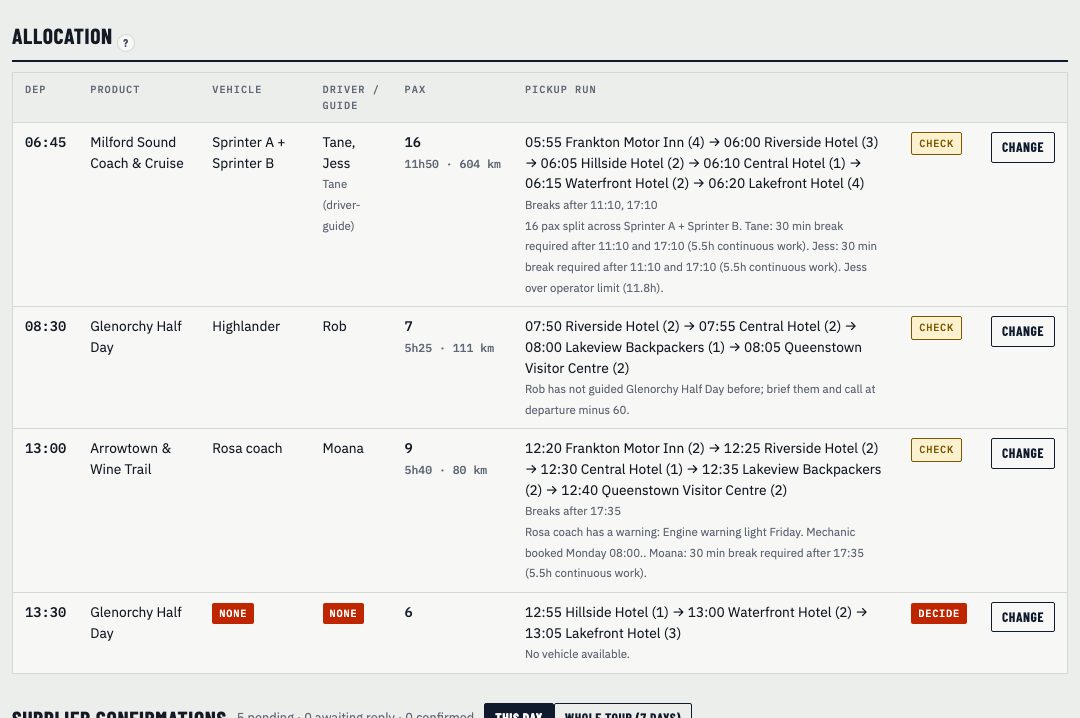
Most booking systems fill the first van, then the next one. They don't know who can drive what. DayRunner checks the things you check in your head every evening:
On-call casuals are never rostered on their own. They only go on a run when you set them, or when you pick them as a fix.
Each run gets its pickup sequence: stop, time, guest names and numbers. Times come from the departure time and the stop order you set up for each product, so your drivers see the run the way they already drive it.
Change sets one departure by hand and locks it. Re-plan and DayRunner keeps your locked runs as they are, then works the rest of the day around them. Anything it can't solve goes to one short list, Decide before the day, with options to pick from.
Yes. Change sets a departure by hand and locks it. When you re-plan, DayRunner keeps the locked run and keeps that driver and vehicle free for it.
No. It reads tomorrow from Rezdy, FareHarbor, Rental Car Manager or a CSV. Bookings stay where they are.
Show us tomorrow in your booking system. We'll show you the same day in DayRunner.