Will it message my guests without asking?
No. Every message is a draft until you approve it. You can edit or hold any one.
Solutions: guest messages
One message per booking, with the right pickup time and place. You read them, change what you like, and approve.
Every evening someone texts 25 guests their pickup time, one at a time. DayRunner drafts all of them from tomorrow's plan, so the job becomes reading and approving.
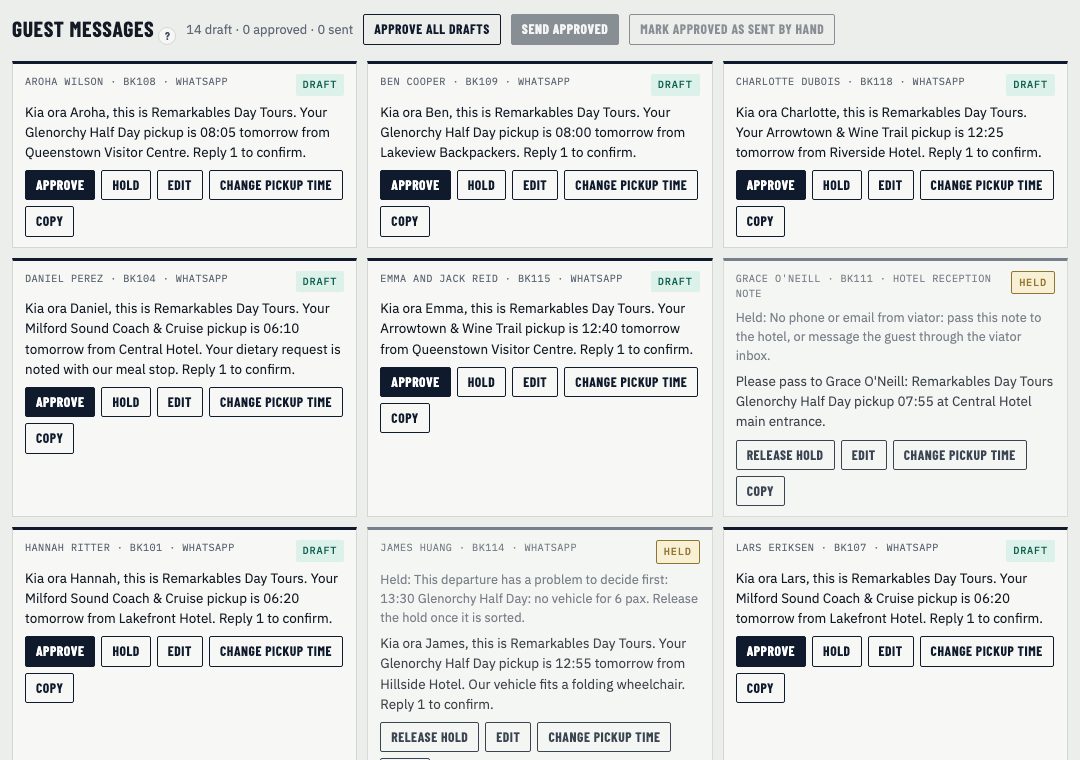
One message per booking, with the guest's name, the pickup time and place from the plan, and the trip. If the plan changes, the drafts change with it.
Each draft has three buttons:
Approve all drafts does the lot in one go, skipping anything held. Nothing sends until you approve it and press send.
DayRunner holds some messages itself. If a run has a problem still to decide, its guests' messages wait, so nobody gets a pickup time that's about to change. If a guest has no phone or email, the message is held and a note for the hotel is drafted instead.
When a driver is off sick and you apply a fix, only the messages that change come back as drafts. Everyone else's message stands.
DayRunner sends email, SMS and WhatsApp for you. That's rolling out with our pilots. Until it's switched on for your account, each approved message shows as "to send by hand": copy it and send it from your own phone or inbox. See integrations.
No. Every message is a draft until you approve it. You can edit or hold any one.
DayRunner sends email, SMS and WhatsApp for you, rolling out with our pilots. Until it's switched on for you, copy each message and send it yourself.
Show us tomorrow in your booking system. We'll show you the same day in DayRunner.