Can drivers see it on their phone?
Yes. The run sheet is built to read on a phone. Invite drivers as guides and they see the day once the office has planned it.
Solutions: run sheets and driver briefs
Every driver-guide knows where they're going, in what, and who they're picking up. You don't type it out.
Once tomorrow is planned, the run sheet and driver briefs come from the same plan. No retyping the board into a WhatsApp group.
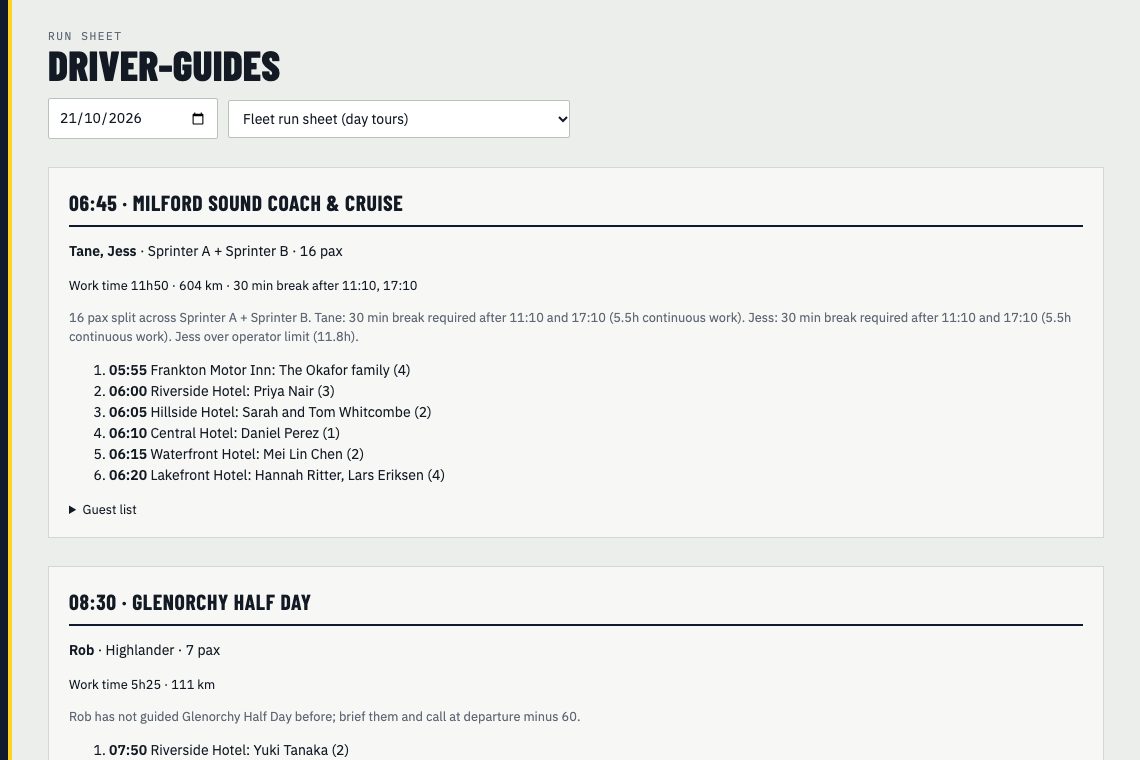
The run sheet lists each departure with its time, product, vehicle and driver. Under it is the pickup run in order: time, place, guest names and how many. It's made to read on a phone, so drivers can check it at the first stop.
On the day, log a no-show against the booking and it's struck through on the run sheet. Where the booking system connector supports it, the no-show is written back to the booking too.
Running a multi-day tour? Pick it from the list and print the day sheet.
The evening before, tap Draft driver briefs. DayRunner writes one brief for each driver-guide from the plan, plus a short digest for the staff WhatsApp group.
Read them, change anything, and approve. Approve all briefs does them in one go. Nothing sends until you approve it. Briefs go out with your other approved messages, or copy the digest into the staff group yourself.
Re-plan and the run sheet updates. If a driver is off sick and you apply a fix, re-draft the briefs and the cover driver gets theirs.
We estimate driver briefs take 10 to 15 minutes by hand and about 2 minutes in DayRunner. That's from our time-savings model, and our pilots will measure the real number.
Yes. The run sheet is built to read on a phone. Invite drivers as guides and they see the day once the office has planned it.
Yes. Multi-day tours have a printable day sheet.
Show us tomorrow in your booking system. We'll show you the same day in DayRunner.