Does applying a fix message my guests?
No. Guest messages that change come back as drafts for you to approve. Nothing is sent.
Solutions: driver off sick and disruptions
Tell DayRunner who's off. It shows every run they held, who could cover and why it's hard, and the two best fixes.
A driver calling in crook at 6am is the morning every operator dreads. In DayRunner you tap Report a problem, then Driver off sick, and pick who's off. In seconds it shows what breaks and the two best ways to fix it.
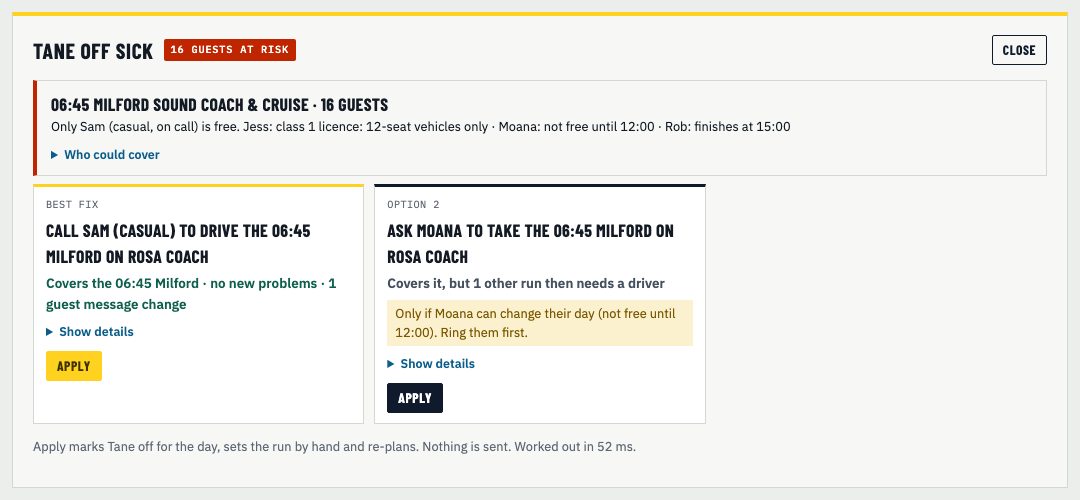
On the Day page, tap Report a problem, then Driver off sick, and pick the driver.
Every run they held, guests at risk, and one line on why it's hard to cover.
The best fix and a second option, each with a plain outcome.
DayRunner marks the driver off, sets the run and re-plans. Nothing is sent.
It rules out anyone without the right licence class or P endorsement, vehicles that are out of service, and vehicles without enough seats. The rest is the same planner that builds your day, so hours and work time are checked too.
Each fix leads with what it means for your day. "Covers the 06:45 Milford, no new problems, guest messages unchanged." Or "covers it, but 1 other run then needs a driver." Show details has the knock-ons.
When you apply a fix, the run is locked to the new driver and vehicle and the day re-plans. Guest messages that change come back as drafts for you to approve.
Driver off sick is live today. Vehicle problems, late flights and more disruption types are planned. See the roadmap.
No. Guest messages that change come back as drafts for you to approve. Nothing is sent.
Driver off sick is live now. Late flights and more disruption types are on the roadmap.
Show us tomorrow in your booking system. We'll show you the same day in DayRunner.