Does it change the plan on its own?
No. A warning only affects the plan when you tap Add to alerts. Then it shows on your decisions list and you choose what to do.
Solutions: conditions and road warnings
The things that change a day before it starts, shown on the Day page next to the plan. One tap adds any of them to tomorrow's alerts.
At 5pm you're planning tomorrow, and the weather and roads matter as much as the bookings. DayRunner puts them on the Day page, above the plan, for the date you're planning.
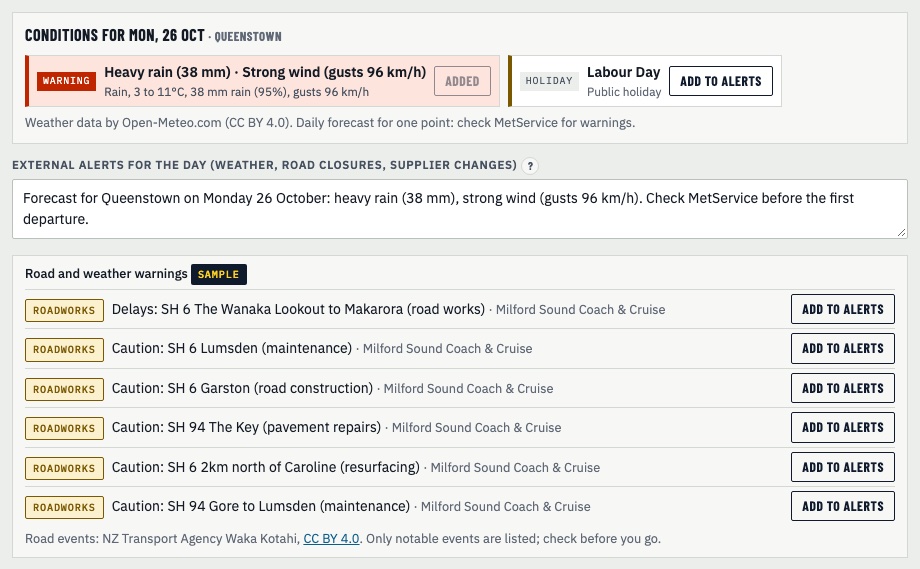
Set your base town once in Setup. Then the strip shows:
Give each product its routes in Setup, like SH94, SH6 or Fiordland. DayRunner lists NZ Transport Agency road events and MetService severe weather warnings that touch those routes, or your base town, on the plan date. Each one shows what it is, which product it hits and where it came from.
Every item has an Add to alerts button. It writes one plain sentence into the day's alerts. When you re-plan, that alert lands on your Decide before the day list, with options to adjust departure times, brief drivers or hold guest messages. Its first sentence goes into the guest messages, so guests hear about it from you.
Nothing goes into the plan unless you add it.
No. A warning only affects the plan when you tap Add to alerts. Then it shows on your decisions list and you choose what to do.
Not always. NZTA only lists notable events, and a daily forecast can miss a short heavy burst. Check MetService and the NZTA map before you go.
Show us tomorrow in your booking system. We'll show you the same day in DayRunner.