Does applying a fix message my guests?
No. Guest messages that change come back as drafts for you to approve. Nothing is sent.
Solutions: when the day changes
Tap Report a problem and say what's gone wrong. DayRunner shows every run it touches and up to three ranked fixes. Nothing changes until you apply one.
Plans change. A driver rings in crook, a van won't start, a family doesn't show, four walk-ins turn up, or a flight lands late. In DayRunner you tap Report a problem on the Day page and pick what's gone wrong. In seconds you see what it breaks and the best ways to fix it.
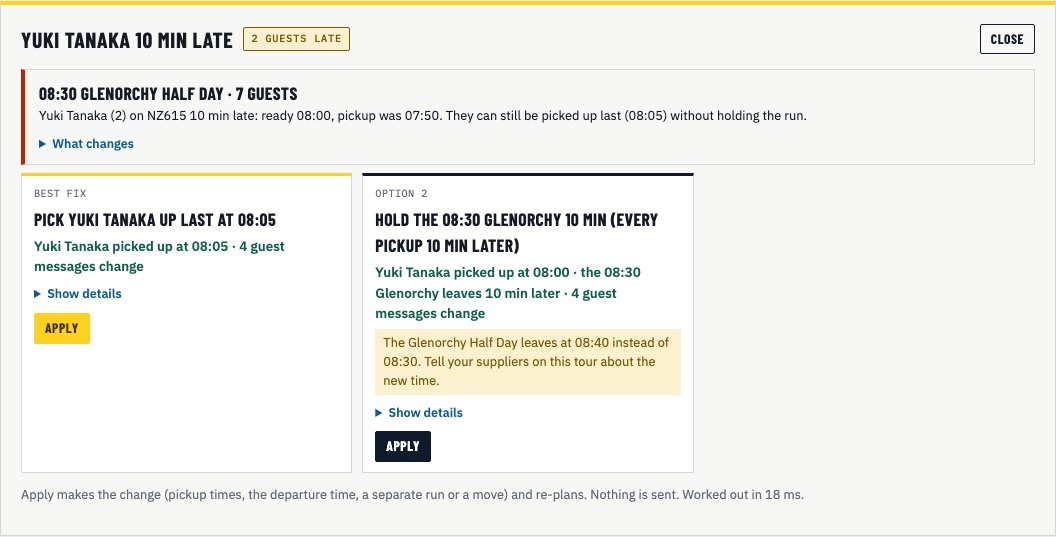
Each fix leads with what it means for your day, like "Covers the 06:45 Milford, no new problems, guest messages unchanged". Fixes that leave other runs short rank lower and say so. Fixes that need someone to agree, like a guest moving departure, ask you to check first.
Every fix goes through the same checks as the plan: seats, licence class, vehicle needs and NZ work time.
Apply makes the change, locks the runs and re-plans the day. Guest messages that change come back as drafts. You approve them as usual.
No. Guest messages that change come back as drafts for you to approve. Nothing is sent.
Not yet. You type in how many minutes late the guest is. A live flight status feed is on the roadmap.
Hand changes to runs are kept. A moved booking or a held departure time should also be changed in your booking system, or the next sync can put it back.
Show us tomorrow in your booking system. We'll show you the same day in DayRunner.